What an independent living alarm does and how it supports daily life
For older New Zealanders who value their own home and daily routines, staying connected while living independently is not just about phone calls or internet access. It is about knowing that help can reach you quickly if something goes wrong. An independent living alarm is one practical tool that helps make that possible. It is a small wearable device that lets you call for assistance at the press of a button, and it can work anywhere around the house or even outdoors.
These alarms are designed for people who live alone or spend long stretches of the day by themselves. They are common in retirement villages and private homes alike. The basic idea is straightforward: you wear a pendant or a wristband with a button. If you fall, feel unwell, or simply need to speak with someone, you press that button. The alarm connects you to a monitoring service or directly to a family member, depending on how the system is set up. Some devices also detect falls automatically, which can be a real help if you are unable to press the button yourself.
How the alarm works in everyday use
The device itself is small and lightweight. You wear it around your neck or on your wrist, much like a piece of jewellery or a watch. Most models are waterproof, so you can keep them on in the shower or while doing dishes. The button is large enough to press easily, even if your hands are not as steady as they used to be.
When you press the button, the alarm sends a signal through a base unit in your home. That base unit is plugged into your landline or uses a mobile network to place a call. Some newer systems use a SIM card and mobile coverage, which means they do not need a landline at all. The call goes to a monitoring centre or to a list of emergency contacts you have set up. The person who answers can talk to you through the device’s speaker and microphone, so you can explain what is happening. They can then arrange for help, a neighbour, a family member, or an ambulance, depending on the situation.

Fall detection is a feature that many people find reassuring. The device contains sensors that can recognise the motion and impact of a fall. If it detects a fall and you do not cancel the alert within a short time, it automatically calls for help. This is especially useful if you are unconscious or unable to reach the button after a fall.
Who benefits most from an independent living alarm
Anyone who lives alone and wants a backup way to call for help can benefit. That includes older adults who are still active but have a health condition that could cause a sudden problem, such as heart disease, diabetes, or epilepsy. It also suits people who have had a fall before and are worried about it happening again when no one is around.
For family members who live in another city or even just across town, knowing that their parent or relative has an alarm can reduce worry. It does not replace regular contact or a care plan, but it adds a layer of safety that works 24 hours a day. The alarm does not judge or interrupt; it just waits until it is needed.
What to look for when choosing a system
Not all independent living alarms are the same, and the right choice depends on your living situation and preferences. Here are a few things to consider:
- Range and coverage: Some alarms work only inside the home, within a certain distance of the base unit. Others use GPS and mobile networks to work anywhere, which is useful if you spend time in the garden, at the local shops, or visiting friends.
- Battery life and charging: Most wearable pendants have a rechargeable battery that lasts a day or two, or a disposable battery that lasts several months. Check how often you will need to charge or replace it, and whether the device reminds you when the battery is low.
- Fall detection: If you are unsteady on your feet or have a condition that increases your risk of falling, look for a model with automatic fall detection. It adds to the cost, but it can be a lifesaver if you cannot press the button.
- Two-way calling: A speaker and microphone in the base unit let the monitoring service talk to you directly. This can be reassuring because the person on the other end can ask what is wrong and stay on the line until help arrives.
These features vary between products, so it pays to read the specifications carefully. A system that seems cheap may lack important functions, while a more expensive one might have features you never use.
How it fits into a wider care plan
An independent living alarm is not a replacement for regular visits from family or a home care worker. It is a tool that sits alongside other parts of your support network. Many people combine it with a daily phone call from a relative, a meal delivery service, or a community group that checks in on older residents. The alarm adds an extra layer of security, but it does not replace human contact.
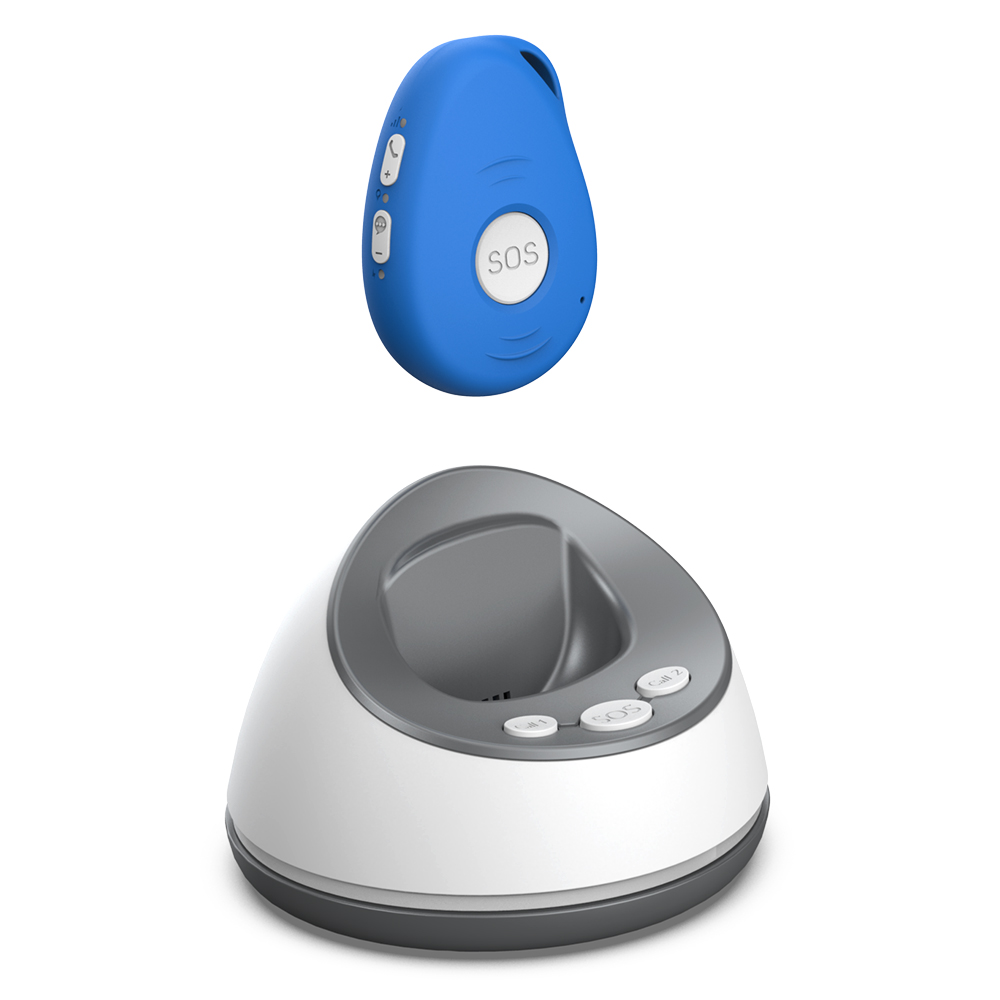
It is also worth thinking about who will be contacted when the alarm is pressed. Some services let you set up a list of emergency contacts: a neighbour, a son or daughter, and then a friend. The monitoring service will try each number in turn until someone answers. This is called a cascade call. It means that if your daughter is at work and cannot answer, the system will try the next person on the list. That way, help is almost always found quickly.
For families who want to stay closely involved, a system that contacts them directly rather than a monitoring centre can work well. One option is a family-monitored wearable alarm, such as the one described at familyr.co.nz. With this approach, the alert goes straight to a family member’s phone, so they can respond personally. There are no monthly monitoring fees, and the family decides who to call and what to do. This can feel more natural for families who want to keep care within the family rather than outsourcing it to a call centre.
Practical tips for getting started
If you are considering an independent living alarm, here are a few steps to help you choose and set it up:
- Check mobile coverage: If the alarm uses a mobile network, make sure the signal is strong in your area. You can ask the provider for a coverage map or check with your mobile phone network.
- Test the device before relying on it: Set it up, press the test button (most have one), and confirm that the alert reaches the right person. Do this when you are not in a hurry, so you can work through any glitches.
- Think about where you spend time: If you spend a lot of time in the garden or at the local park, a home-only alarm may not be enough. A GPS-enabled pendant gives you freedom to go out without losing the safety net.
- Talk to your family: Let them know how the alarm works and what they should do if they receive an alert. A quick conversation now can prevent confusion later.
Once the alarm is set up, wear it consistently. It only helps if you have it on. Many people take it off at night or when they shower, but a waterproof pendant can stay on in both situations. The habit of wearing it becomes second nature after a few days.
What it means for your daily life
An independent living alarm does not change your routine. You still get up, make breakfast, watch television, and go about your day. What changes is the background sense of security. You know that if you stumble or feel dizzy, you can get help without having to crawl to the phone or wait for a neighbour to pass by. That peace of mind is often the biggest benefit.

It also means that family members can relax a little. Instead of calling every morning to check that you are okay, they can trust that the alarm will alert them if something is wrong. That shift can improve relationships, because conversations are no longer dominated by worry. You can talk about your day instead of being asked whether you have fallen.
Living independently does not have to mean living without backup. The right alarm system lets you keep your freedom while making sure that help is never far away. Whether you choose a monitored service or a family-monitored system like the one offered by familyr.co.nz, the important thing is to have a plan that works for you and your family. That plan can evolve as your needs change, but starting with a reliable alarm is a solid first step.